

WordPress Photo Gallery Search
Gallery search improves user experience by helping visitors find specific photos in a WordPress gallery.
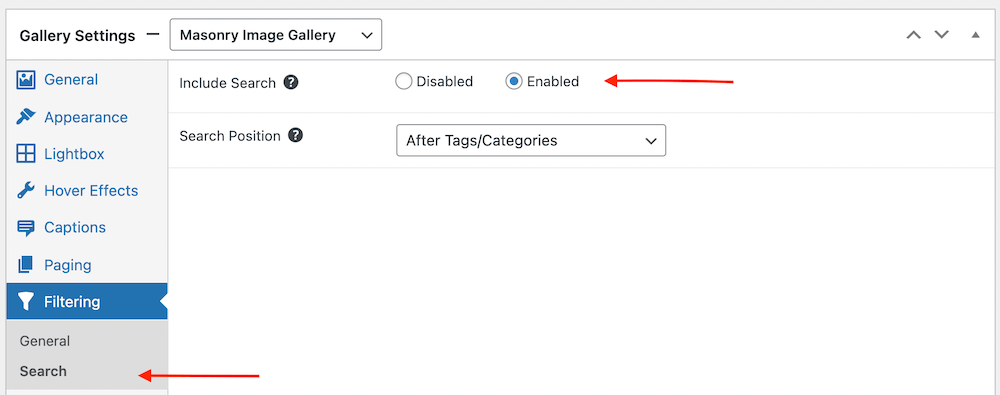
Enable search for any gallery.
Help visitors locate images quickly in larger collections.
Available in the Pro Expert and Pro Commerce plans.
PRO Expert required plan
100K active installs
4.8 / 5 rating
30-day guarantee
Live demo
See WordPress Photo Gallery Search
Use the demo below to see how Gallery Search behaves in a real FooGallery layout.




















Interact with the gallery above to evaluate the layout, browsing flow, and lightbox behavior.
Who this is for?
For galleries where visitors know what they want to find.
Use gallery search when a large image collection needs a direct way to find specific photos or topics.
- Large archivesHelp visitors search by image titles, captions, tags, or relevant metadata.
- Event galleriesMake it easier to find people, moments, products, or locations inside big collections.
- Resource librariesTurn a gallery into a searchable visual index.
Availability
Check the FooGallery plan for this feature.
Check the minimum FooGallery plan, course, or add-on before choosing your next step.
Not included
Free
This feature is not included in FooGallery Free.
Not included
PRO Starter
This feature is not included in PRO Starter.
Minimum plan
PRO Expert
PRO Expert includes this feature.
Also included
PRO Commerce
PRO Commerce includes all PRO Expert features.
Ready for the next step?
Read through the relevant documentation or head over to our pricing to get started
Related features
Compare Related FooGallery Features
Check out these related FooGallery features to improve your WordPress galleries

Grid Layout
A grid display with the full-size image opening in the gallery.

Polaroid Layout
A playful layout with thumbnails framed as Polaroid photos.

Post Query Gallery
You can add galleries from datasources, one of which is a Post Query, so you can populate your gallery with featured images from your posts.
FAQs
Frequently Asked Questions
Answers to common questions about Gallery Search.
Gallery search improves user experience by helping visitors find specific photos in a WordPress gallery. You can enable Search for any gallery.
Search is available in FooGallery PRO Expert.
The Search function can be helpful in improving user experience, making it easier to find specific images. This is particularly relevant for larger galleries, as users won’t need to scroll through the entire gallery to find what they are looking for.
Search is different to filtering. Both make use of tags or categories but while filters will show you the images assigned to that tag, the search can help refine the results. Ideally, large galleries should pair search with Filtering to further improve performance and user experience.
Ready when you are
Ready to use WordPress Photo Gallery Search?
Compare FooGallery PRO plans to confirm this feature is available and choose the license that fits your site.